Author: Ikram

  • Alibaba’s Open-Source Qwen 3 TTS Challenges ElevenLabs’ Dominance

    Alibaba’s Open-Source Qwen 3 TTS Challenges ElevenLabs’ Dominance

    For the past year, ElevenLabs has reigned supreme as the gold standard for AI voice synthesis. Its ability to clone voices with startling accuracy created a moat that few competitors could cross—until now. The release of Alibaba Cloud’s Qwen 3 TTS (Text-to-Speech) marks a pivotal shift in the generative AI landscape: high-fidelity voice cloning is no longer just a paid cloud service; it is now open-source, free, and capable of running offline on hardware as humble as a Raspberry Pi.

    This democratization of voice technology brings exciting possibilities for developers, but it also triggers urgent alarms for content creators and security experts who fear the era of verifiable digital identity is coming to an end.

    Cloud Gatekeepers to Local Freedom

    Until recently, high-quality voice cloning required a subscription to a service like ElevenLabs. These platforms, while powerful, operate with “guardrails”—safeguards intended to prevent users from cloning voices without consent. They run on massive cloud servers, keeping the technology centralized and (mostly) moderated.

    Qwen 3 TTS shatters this model. Released by Alibaba’s Qwen team, this open-source suite includes models for voice design, cloning, and generation. Unlike its cloud-based predecessors, it can be downloaded and run entirely locally.

    “I can run it on a Raspberry Pi with an external GPU. I can run it on my Mac. I could even run it on my phone if I wanted to,” notes a tech commentator and content creator who recently tested the model. “Cloning someone’s voice used to take at least a little effort. Now it’s even easier, and some people can do it free and offline at home.”

    The One-Shot Cloning Reality

    The core innovation of Qwen 3 TTS is its “zero-shot” capability. Users don’t need hours of studio-quality audio to train a model. A mere snippet—often just a few seconds ripped from a YouTube video or a voicemail—is sufficient.

    In a recent demonstration, the new model was fed a short clip of a creator’s voice along with a transcript. Within minutes, the software produced a cloned audio track that, while not perfectly capturing the original speaker’s full vocal range or unique “quirks,” was convincing enough to fool a casual listener.

    “It’s good enough that it can fool you if it’s a short phrase,” the creator observed. “If I generated different ways and tweaked it a little bit, I could generate the audio for an entire video and you probably wouldn’t notice.”

    The “AI Slop” Problem and Creator Rights

    For online personalities, voice is more than just a means of communication—it is intellectual property and a primary revenue stream. The ease with which Qwen 3 TTS allows for unauthorized cloning raises significant ethical and legal questions.

    “My voice is my passport. Verify me,” goes the famous line from the movie Sneakers, a sentiment echoed by creators who now find their biometric data vulnerable. The concern isn’t just about fraud, but about the proliferation of “AI slop”—low-effort, mass-produced content that uses stolen voices to lend credibility to spam or misinformation.

    “I’ve already seen other people use my voice and I didn’t authorize it,” the creator shared. “I’m a little worried that… we’re going to see more AI slop that actually looks like it’s realistic because now it’s easier and quicker to generate people’s voices to go behind it.”

    The Unpoliced Frontier

    The most significant difference between Qwen 3 TTS and ElevenLabs is not just price, but control. When a model is open-sourced and downloadable, the safety filters disappear. There is no Terms of Service agreement stopping a bad actor from running the software on a disconnected laptop to clone a politician, a CEO, or a relative for a scam call.

    While Alibaba likely includes standard safety licenses, enforcing them on offline, local machines is virtually impossible. As software tools and easy-to-use Windows or Mac apps inevitably wrap this model into user-friendly interfaces, the barrier to entry for voice cloning will effectively drop to zero.

    Conclusion

    The release of Qwen 3 TTS is a technical marvel, bringing state-of-the-art AI audio to the edge. However, it also signals the end of the “security through obscurity” era for voice biometrics. As the gap between real and synthetic audio closes, and as the tools to create it become ubiquitous, the digital world must prepare for a reality where hearing is no longer believing.

    Explore 7000+ AI tools here


    Key Resources:

    • Hugging Face Demo: The Qwen 3 TTS models are hosted on Hugging Face, allowing users to test the “Voice Design” and “Voice Clone” features directly in the browser (server-side).
    • Hardware Requirements: While optimized for consumer hardware, running the full model locally benefits from a GPU (like an NVIDIA card or Apple Silicon), though lighter versions are being tested on devices as small as the Raspberry Pi 5.
  • Stop Paying for AI Video: How to Generate Unlimited Clips Locally on Your PC

    Stop Paying for AI Video: How to Generate Unlimited Clips Locally on Your PC

    Are you tired of running out of credits on expensive AI video platforms? Or maybe you’re worried about privacy and want to keep your creative projects on your own machine.

    If you have a decent PC, there is a better way.

    Today, we’re going to walk through how to generate high-quality AI videos (complete with audio and narration!) entirely for free, right on your computer. We will be using powerful open-source models like LTX-2 and Wan, all managed through a user-friendly tool called Pinokio.

    No subscriptions. No usage limits. 100% private. Let’s dive in.


    🛑 Step 0: Check Your Hardware

    Before we start downloading, we need to make sure your rig can handle the heat. AI video generation is resource-intensive.

    You will need a computer with a dedicated NVIDIA graphics card (GPU).

    • Minimum: 6–8 GB of VRAM.
    • Recommended: 12GB+ (allows for better performance and longer clips).

    How to check your VRAM (Windows):

    1. Press Ctrl + Shift + Esc to open Task Manager.
    2. Click on the Performance tab on the left.
    3. Select GPU.
    4. Look for the number next to “Dedicated GPU Memory.”

    If you have at least 6GB, you’re good to go!


    🛠️ Step 1: Install Pinokio (The “Steam” of AI)

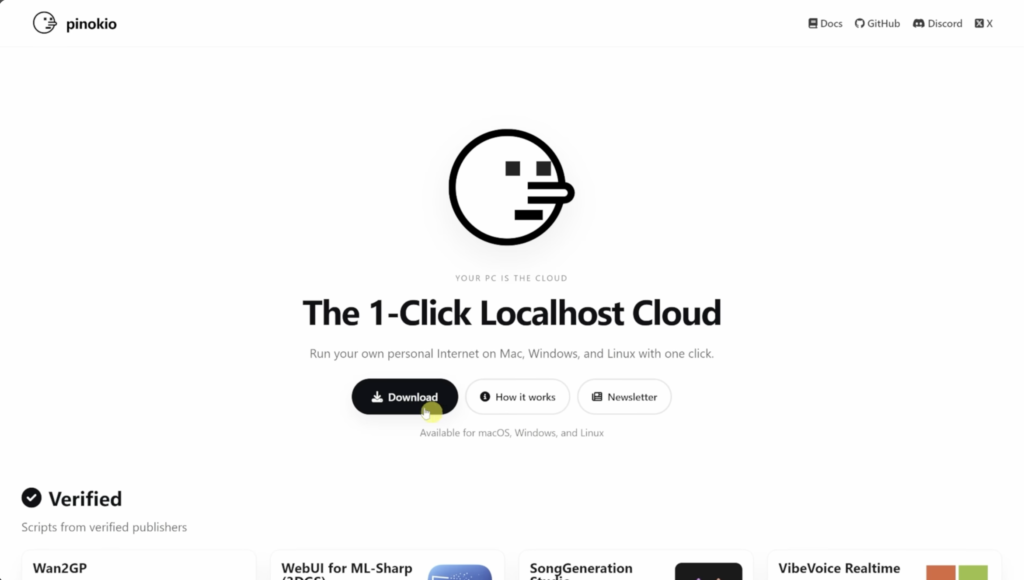
    Installing AI tools used to be a nightmare of Python versions, CUDA drivers, and command lines. Enter Pinokio. Think of Pinokio as a one-click installer for AI—similar to how Steam works for games. It handles all the messy code stuff for you.

    1. Head to the Pinokio website.
    2. Click Download and select your OS (Windows, Mac, or Linux).
    3. Run the installer.
    4. When prompted for a project name, the default is fine. Click Download and then Install.

    Note: The initial install might take a few minutes as it grabs necessary dependencies. You only have to do this once.


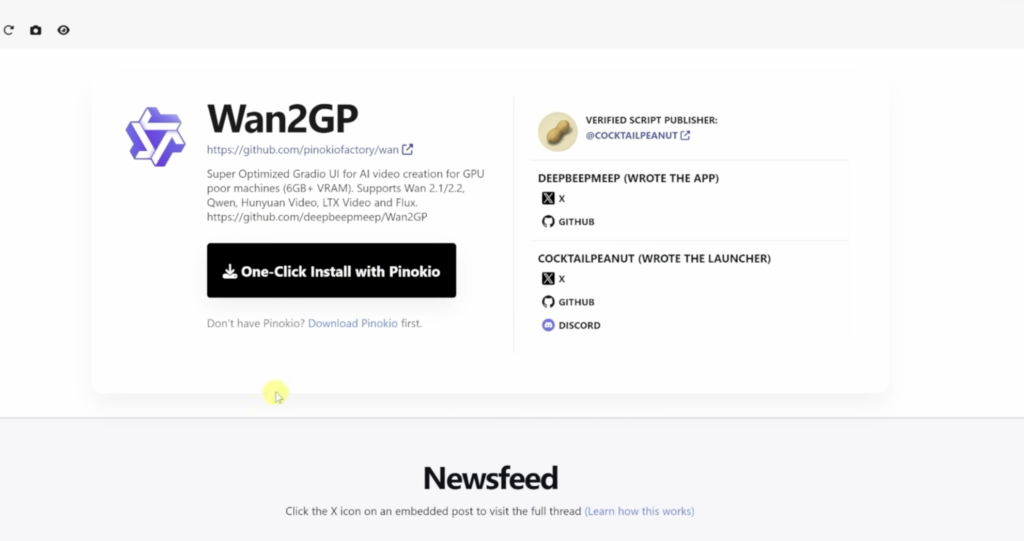
    📥 Step 2: Install Wan2GP

    Once Pinokio is open, you’ll see a dashboard. We need a specific script called Wan2GP to run our video models.

    1. Click on the Discover button.
    2. Search for “Wan2GP”.
    3. Click Install.
    4. Pinokio will list the dependencies. Just click Install at the bottom and let it run.

    Once finished, click the icon to launch it and hit Start. When the web interface loads in your browser, you are ready to create.


    🎬 Step 3: Configure Your Model (LTX-2)

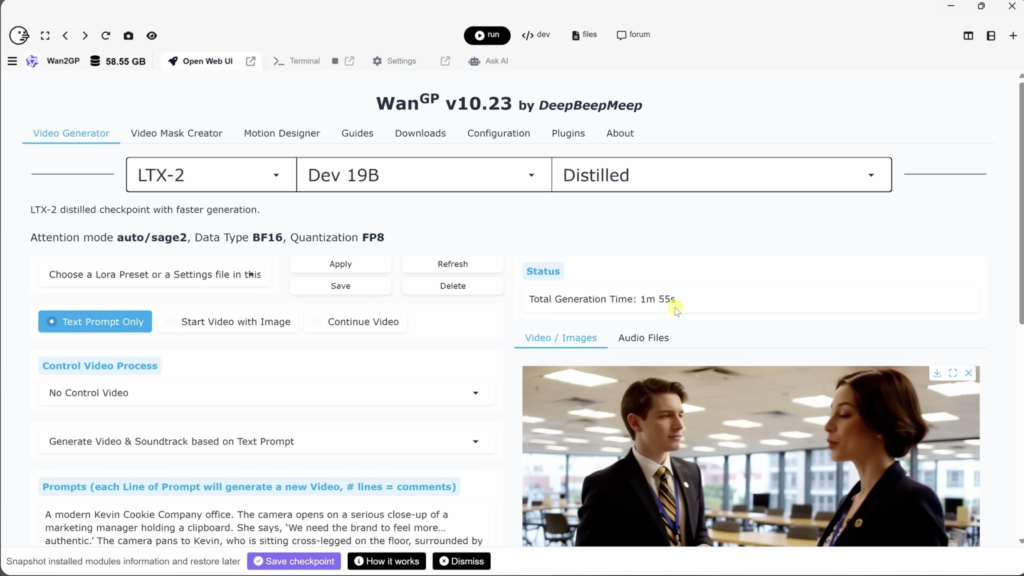
    In the Wan2GP interface, you’ll see a Video Generator tab. Here is how to set it up for the best results:

    • Model Selection: Choose LTX-2. This is a newer model that is impressive because it can generate video, sound, and narration simultaneously.
    • Model Type: Select Distilled.
      • Why? The distilled version is about half the size (~20GB) of the default model. It runs much smoother on consumer graphics cards with very little loss in quality.
    • Performance Profile: Go to the Configuration tab -> Performance. Choose a profile that matches your VRAM (e.g., Profile 2 if you have around 12GB VRAM).

    🎥 Step 4: Generate Your First Video

    Now for the fun part. Go back to the Video Generator tab.

    Text-to-Video

    1. Prompt: Describe what you want to see.
      • Pro Tip: You can script dialogue! Try adding something like: “She looks at the camera and says, ‘This is incredible.’” LTX-2 will attempt to lip-sync and generate the audio.
    2. Resolution: Start with a lower resolution (like 480p or 720p) to test your prompt.
    3. Aspect Ratio: Choose 16:9 for YouTube or 9:16 for TikTok/Reels.
    4. Duration: Set your frame count (e.g., 240 frames is roughly 10 seconds).
    5. Hit Generate.

    Note on Speed: The first time you run a prompt, it may take a minute or two to load the model into memory. Subsequent generations will be much faster (often around 30 seconds).

    Image-to-Video

    Want to animate a still photo?

    1. Select “Start Video with Image” at the top.
    2. Drag and drop your image into the media box.
    3. Write a prompt describing the motion (e.g., “The snow continues to fall as the camera pans forward”).
    4. Hit Generate.

    📂 Where are my files?

    Pinokio saves your masterpieces in a specific folder structure. To find them:

    1. Click the “Total Space” tab at the top of the Wan2GP window to open File Explorer.
    2. Navigate to: wan.git > app > outputs.

    Final Thoughts

    We are entering a new era where you don’t need a massive server farm to create AI media. With tools like Pinokio and LTX-2, you have a creative studio right on your desktop—free, private, and unlimited.

  • The Best AI Agents of 2026

    The Best AI Agents of 2026

    The era of “Generative AI” is evolving into the era of “Agentic AI.” In 2024 and 2025, we were amazed by chatbots that could write poetry or generate images. But in 2026, the focus has shifted to AI Agents—software that doesn’t just saythings, but does things.

    Unlike standard tools that wait for your input, AI agents can autonomously plan workflows, execute multi-step tasks, and self-correct when they encounter errors. For businesses and developers, this means the difference between having a smart assistant and having a digital employee.

    At NeonRev, we track thousands of AI tools. Based on our data and the latest market movements, these are the top AI agents defining the landscape in 2026.

    1. The “Digital Workforce” (General Business Automation)

    These agents are designed to act as functional employees, handling specific departments like HR, Marketing, or Operations.

    • Sintra AI Sintra is a standout for entrepreneurs who need an instant team. It offers specialized “helpers” for distinct roles—such as a Copywriter, Social Media Manager, or Customer Support Agent. Its core differentiator is the “Brain AI,” a central hub that stores your brand’s tone and files, ensuring all agents stay “on brand” without constant prompting.
      • Best For: Small business owners replacing manual admin work.
    • Lindy Lindy focuses on “no-code” workflow automation. It excels at handling the “glue” work of business: managing inboxes, scheduling meetings, and triaging customer emails. It integrates with over 7,000 apps, allowing you to build an “Executive Assistant” that actually has access to your calendar and CRM.
      • Best For: Ops managers and founders drowning in admin tasks.
    • Beam AI For companies tired of AI demos that break in the real world, Beam AI is the “production-grade” option. It uses “Self-Learning” agents that follow Standard Operating Procedures (SOPs). If a process changes, the agent adapts, making it highly reliable for strict industries like Finance and HR.
      • Best For: Mid-sized companies needing reliable, audit-ready automation.

    2. The Developers (Coding & Technical Agents)

    • AutoGPT As one of the most famous open-source projects, AutoGPT changed the game by demonstrating how LLMs could chain thoughts together. It can browse the web, write code, and execute programs to achieve a high-level goal (e.g., “Build a weather app”) with little human intervention.
      • Best For: Developers and technical tinkerers who want to build custom agents.
    • Devin (by Cognition) Devin is widely recognized as the first fully autonomous AI software engineer. It doesn’t just autocomplete code; it can plan an engineering project, fix bugs, and deploy the final application.
      • Best For: Engineering teams looking to automate bug fixes and routine maintenance.

    3. The Voice & Service Agents

    • Maqsam We are moving beyond “Press 1 for Support.” Maqsam offers “Voice-First” agentic AI that can hold natural conversations in multiple languages and dialects. It can route calls, qualify leads, and update CRMs in real-time, effectively acting as a 24/7 frontline worker.
      • Best For: Call centers and global customer support teams.
    • Bland AI Similarly, Bland AI provides hyper-realistic phone agents for enterprise. It is used to automate high-volume phone tasks, offering a scalable alternative to traditional BPO (Business Process Outsourcing) call centers.
      • Best For: Enterprise sales and outreach.

    4. The Enterprise Giants

    • Salesforce Agentforce For companies already living in Salesforce, Agentforce is the new standard. It embeds autonomous agents directly into the CRM. These agents can independently resolve customer support tickets (Salesforce claims up to 70% automated resolution) and manage sales pipelines without data entry.
      • Best For: Large sales and support organizations.
    • Microsoft Copilot Vision Agents If your life revolves around Excel and Teams, these agents are your force multiplier. They can execute cross-app workflows, such as analyzing a spreadsheet in Excel and automatically scheduling a meeting in Outlook to discuss the findings.
      • Best For: Corporate environments using the Microsoft 365 stack.

    5. The SEO & Research Agents

    • Surfer SEO While many tools write content, Surfer acts as an SEO strategist. It analyzes search results to tell you exactly what to write, how long it should be, and which keywords to include. It’s moving toward full autonomy, where it can audit and optimize content with minimal oversight.
      • Best For: Content marketers who need to rank on Google.
    • Perplexity AI While often used as a search engine, Perplexity functions as a “Research Agent.” It can browse the internet, synthesize multiple sources, and produce detailed reports with citations, saving hours of manual Googling.
      • Best For: Deep research, academic work, and market analysis.

    Which Agent Should You Choose?

    The “Agentic” revolution is about matching the tool to the workflow.

    • Need a Virtual Assistant? Try Lindy.
    • Need a Dev Team? Look at AutoGPT or Devin.
    • Need Enterprise Reliability? Stick with Salesforce or Beam AI.

    To explore these agents and hundreds more, browse the AI Agents category right here on NeonRev.